

What is Replit?
Replit is your creative partner. Replit takes your ideas, helps you refine them, and then makes them real. Unlike a chatbot that only answers questions, Replit takes action: it sets up your project, creates applications, checks its work, and fixes problems along the way. Describe what you want in everyday language. No code or technical knowledge required. Replit handles the rest, from planning to deployment.How to use Replit
Getting started
1
Describe what you want
In the Project Editor, just start chatting. Describe an app you want to build, ask a question, research a topic, or pull data from connected services like BigQuery, Slack, or Notion. There are no constraints. Replit handles whatever you throw at it.
2
Choose what to build
Optionally, select a project type: web app, mobile app, slides, design, data visualization, and more. If you already described what you want in step 1, Replit figures out the right setup automatically.
3
Replit builds it
Replit writes code, sets up infrastructure, and tests the result. Once you’re in your project, you can switch between model tiers to control how it builds.
4
Chat with Replit to refine your project, then publish when you’re ready. All artifacts publish together.
You’re not locked into one type. Start with a web app and add a mobile app, slides, or a video later — all in the same project.
Plan before building
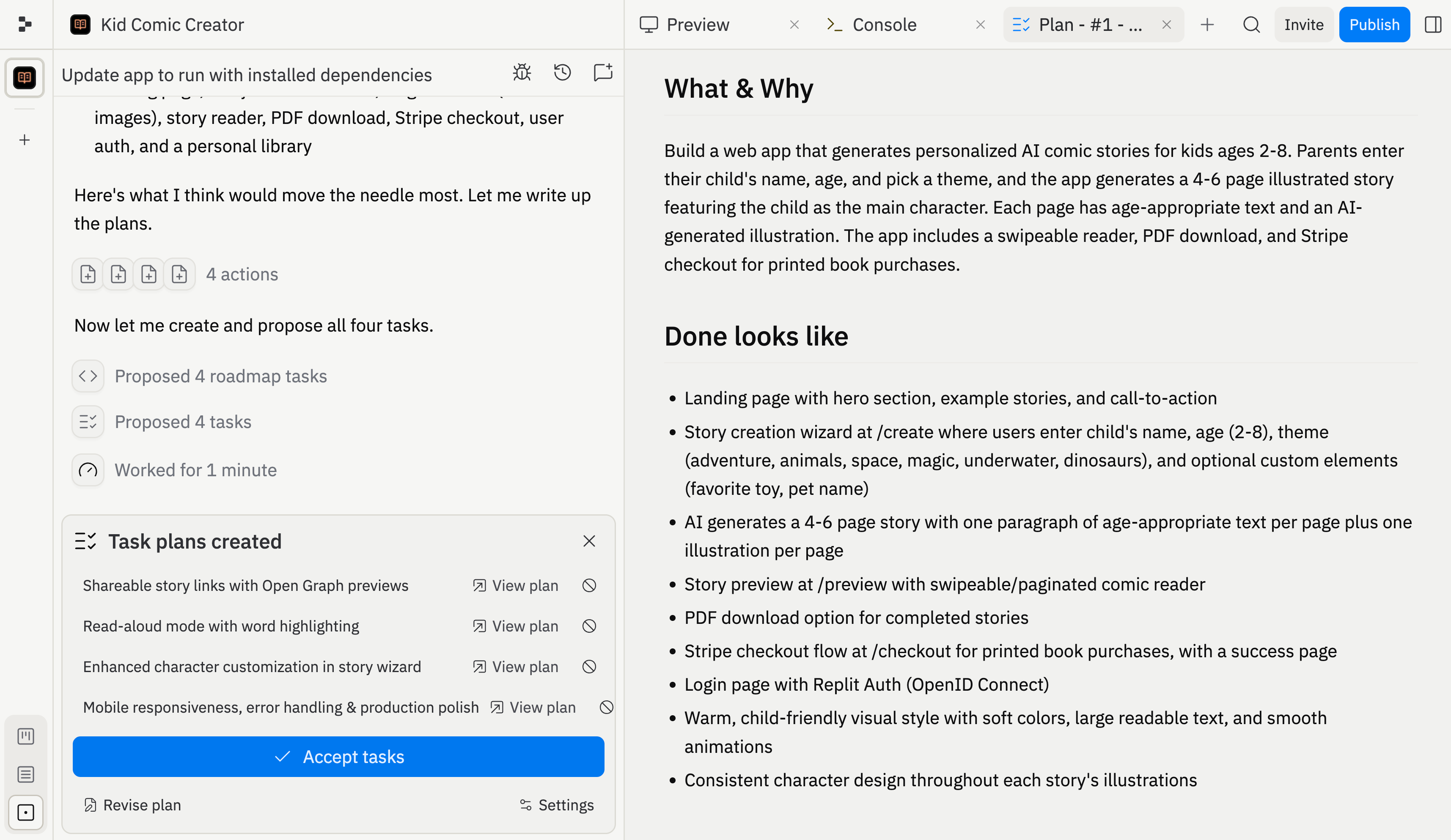
Ask Replit to plan in plain language, or use the optional/plan shortcut. Replit often plans proactively when your request needs it. Use planning to:
- Break down complex projects into ordered task lists
- Explore different approaches and weigh trade-offs
- Review and refine before any code is written
Model tiers
Choose how Replit builds your project: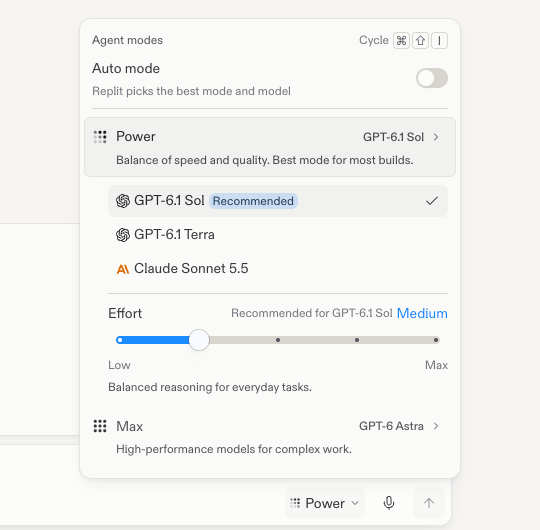
The Agent modes popover with Free, Power, and Max modes.
- Free Mode: No-cost everyday Replit AI work within your plan’s allowance. The Core and Pro allowances reset every five hours and have weekly limits. The Starter tier keeps its existing limits. Check Usage in Settings to see your usage.
- Auto: Automatic model selection for paid work in Power or Max on Core and Pro.
- Power: A paid, mid-tier mode with powerful models at an affordable price.
- Max: A paid, top-tier mode with the best frontier models for the most demanding work.
Ask Replit to plan your work before building.
/plan is an optional shortcut.What you can build with Replit
- Web apps, mobile apps, data dashboards, and AI-powered tools
- Visual designs and prototypes — explore mockups on the Design Canvas before committing to code
- Multiple outputs in one project — web apps, mobile apps, slides, and videos sharing the same backend
- Files and documents — CSVs, PDFs, PowerPoint files, Markdown docs
- Connected service queries — pull data from BigQuery, Linear, Slack, Notion, and more directly from chat
Start building now
Describe your idea and let Replit bring it to life, with no setup required.
Frequently asked questions
Do I need to know how to code?
Do I need to know how to code?
No. Replit handles all the technical work: writing code, setting up infrastructure, and configuring databases. You describe what you want in plain language and Replit builds it.
How does Auto differ from Free, Power, and Max?
How does Auto differ from Free, Power, and Max?
Free Mode is no-cost everyday Replit AI work within your plan’s allowance. In Power or Max, Auto selects a model for each paid task. Power is a paid, mid-tier mode with powerful models at an affordable price. Max is the paid, top-tier mode for the most demanding work.Paid actions require confirmation before they start.
Can I build more than one thing in a project?
Can I build more than one thing in a project?
Yes. You can add web apps, mobile apps, slides, videos, and data visualizations to the same project — all sharing the same backend and data.
What happens if Replit makes a mistake?
What happens if Replit makes a mistake?
Replit tests its own work on a regular basis. Replit also creates checkpoints as it works, so you can roll back to any previous state. You can also chat with Replit to describe what went wrong and it will fix the issue.
Availability
Enterprise workspaces use one Auto mode instead of Free Mode. Auto chooses the mode and an allowed model for each task. Account admins can manage model access with Enterprise model controls.
For detailed pricing, see Replit AI billing.
Next steps
Skills
Teach Replit specialized knowledge: use pre-built skills or create your own.
Task system
Kanban planning, background tasks, and changes applied back to the main version.
Design Canvas
Visual mockups and the hands-on visual editor.
Connectors
Connect BigQuery, Linear, Slack, Notion, and more.
Billing
Replit AI pricing, plan comparison, and spending management.
Vibe coding guide
Tips for effective prompting and building with AI.