

What is Replit AI Integrations?
Replit AI Integrations provides managed access to AI models from leading providers. Build chat apps, content generators, and AI-powered tools without leaving Replit. No need to create external developer accounts, find your API credentials, or manage separate billing. When you use Replit AI Integrations, Replit manages the provider credentials and bills you at the public API price. Your usage is billed to your Replit credits and appears on your usage page, broken down by Existing Replit App.Replit AI Integrations requires a paid plan (Core, Pro, or Enterprise). You can still build AI apps with your own API key on the Starter plan. See Plan availability.
Features
Replit AI Integrations streamlines AI development with built-in access and transparent billing:- Zero setup required: No developer accounts or API keys needed to get started
- Managed credentials: Replit handles provider authentication and credential management
- Transparent billing: Pay public API prices, billed to your Replit credits
- Usage tracking: View your usage per Existing Replit App on your usage page
- Cross-stack support: Works across all programming languages and frameworks
- Optional BYOK: Bring your own API key if you prefer to use your own credentials
Getting started
Using Replit-managed credentials
On a paid plan, when you mention AI functionality or specific providers (OpenAI, Anthropic, Google, or OpenRouter) in your prompt, Agent defaults to using Replit AI Integrations: You can tell which integration is being used by looking for “OpenAI (Replit managed)”, “Anthropic (Replit managed)”, “Google (Replit managed)”, or “OpenRouter (Replit managed)” in your initial prompt response. This indicates Agent will use Replit’s credentials instead of requiring your own API key. For initial builds: When you submit an initial prompt to create a new app with AI functionality, Replit AI Integrations is matched automatically. Agent will start building with Replit’s managed credentials right away. For existing Replit Apps: When Agent detects you want to add AI functionality to an existing Replit App, Agent will explicitly tell you in the Project Editor that it’s asking to use Replit AI Integrations instead of your own API key. You’ll see a confirmation prompt: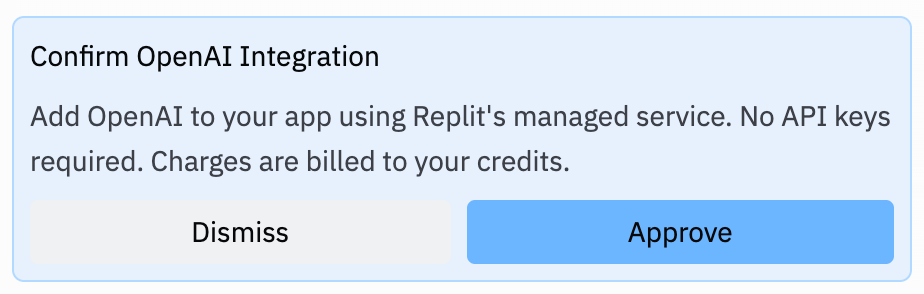
Bringing your own API key
If you prefer to use your own credentials from OpenAI, Anthropic, Google, or other providers instead of Replit AI Integrations, you have a few options: For initial builds: Include in your prompt that you want to use your own API key: You’ll see the provider name (without “Replit managed”) in the response, indicating Agent will request your API key. For existing Replit Apps: When Agent tells you it wants to use Replit AI Integrations and shows the confirmation prompt, click “Dismiss” instead of “Approve.” In both cases, Agent will build through the first checkpoint before requesting your API key. This allows Agent to set up your project structure first, then pause to collect your credentials. When you use your own API key, you’re billed directly by the provider rather than through Replit credits.Viewing your usage
All Replit AI Integrations usage appears on your usage page alongside your other Replit usage. Usage is broken down by Existing Replit App so you can see exactly where your AI spend is going.Supported providers
Replit AI Integrations currently supports:- OpenAI: Multimodal models for text generation, reasoning, and audio. Supports chat completions, responses, image generation, audio transcription (
gpt-4o-transcribe,gpt-4o-mini-transcribe), and audio output (gpt-audio,gpt-audio-mini). - Anthropic: Multimodal models for reasoning, writing, and coding. Supports the Messages API and interactions with web search.
- Google (Gemini): Multimodal models for text generation and reasoning. Supports text and image generation.
- Grok: Models for text generation, reasoning, and coding.
- OpenRouter: Access to models from providers such as Microsoft (Phi series), Meta (Llama series), Mistral, Qwen, DeepSeek, Nvidia, Amazon, and more.
Replit AI Integrations supports text, image, and audio output. Video output is not supported. If you need video generation capabilities, you’ll need to use your own API key from a provider that offers them.
Available models
The following models are available through Replit AI Integrations, grouped by provider. Use the exact model name when you configure a model in your app or ask Agent to build with a specific model.OpenAI
Text and reasoninggpt-6.1-solgpt-6-astra,gpt-6-sol,gpt-6-lunagpt-5.6-sol,gpt-5.6-terra,gpt-5.6-lunagpt-5.5gpt-5.4,gpt-5.4-minigpt-4.1,gpt-4.1-mini,gpt-4.1-nanogpt-4o,gpt-4o-minio4-minio3,o3-mini
gpt-image-2gpt-image-1
gpt-audiogpt-audio-mini
gpt-4o-transcribegpt-4o-mini-transcribe
Anthropic (Claude)
claude-opus-5claude-opus-4-8claude-opus-4-7claude-opus-4-6claude-opus-4-5claude-opus-4-1claude-sonnet-5claude-sonnet-4-6claude-sonnet-4-5claude-haiku-4-5
Google (Gemini)
gemini-3.7-flashgemini-3.5-flashgemini-3.5-flash-litegemini-3.1-pro-previewgemini-3.1-flash-litegemini-3-pro-previewgemini-3-flash-previewgemini-3-pro-imagegemini-3-pro-image-previewgemini-2.5-progemini-2.5-flashgemini-2.5-flash-image
Grok
x-ai/grok-4.7x-ai/grok-4.6
OpenRouter
OpenRouter is a pass-through gateway to 200+ models from providers such as Meta, Mistral, DeepSeek, Qwen, Microsoft, Nvidia, and Amazon. Because the catalog is dynamic, browse the live list at openrouter.ai/models. The models available to you can vary based on the privacy settings Replit applies to your plan.Jev
Jev is a decision model available asjev-latest through OpenRouter via Replit AI Integrations.
This list reflects the models available at the time of publish and is refreshed automatically on a bi-weekly cadence that checks the source configuration. Model availability can change between refreshes.Last updated: October 2, 2026
OpenRouter privacy and availability
When you use OpenRouter through Replit AI Integrations, your requests are sent with specific privacy settings to protect your data. Understanding these settings is important because they may affect which models are available to you.Privacy settings for self-serve users
For individual and team users, Replit configures OpenRouter requests with the following privacy defaults:- Paid endpoints training disabled: Your data will not be used for training by paid model providers
- Free endpoints training enabled: Free model providers may train on your prompts and completions
- Free endpoints publishing enabled: Free providers may publish your prompts and completions to public datasets
- Input/output logging disabled: Your requests and responses are not logged by OpenRouter for the 1% billing discount
- Analytics cookies disabled: Analytics cookies are not used
Privacy settings for Enterprise
For Enterprise organizations, Replit enforces stricter privacy controls:- Zero Data Retention (ZDR) endpoints only: Only models with a Zero Data Retention policy are available
- All privacy settings listed above for self-serve users also apply
- This ensures that Enterprise requests are only routed to endpoints that do not retain any data
Plan availability
Replit AI Integrations requires a paid plan. How access works depends on your plan.Starter (Free)
On the Starter plan, Replit AI Integrations is disabled. You can still build AI apps with your own API key. See Bringing your own API key.Core
On the Core plan, you can build AI apps with Replit AI Integrations using Replit-managed credentials — no API keys to manage.Pro and Enterprise
For Pro and Enterprise organizations, Replit AI Integrations access is disabled by default. Organization admins can control access from the organization settings page:- Navigate to your organization settings
- Find the Replit AI Integrations section
- Toggle access on or off for your organization
Use cases
Build powerful AI applications across any stack:- Content generation: Summarize articles, generate descriptions, create content
- Analysis and insights: Extract key information, analyze sentiment, classify text
- Conversational interfaces: Build chatbots and AI assistants
- Text transformation: Translate, rewrite, or format content
- Code assistance: Generate code snippets, explain algorithms, review code
FAQ
How is this different from other Agent integrations?
How is this different from other Agent integrations?
Other Agent integrations let you connect to external services and APIs. Replit AI Integrations specifically provides managed access to AI model providers like OpenAI, Anthropic, Google, and OpenRouter, with Replit handling credentials and billing so you can start building immediately.
Do I need a paid Replit account?
Do I need a paid Replit account?
Yes. Replit AI Integrations is only available for paying users.
What models are available?
What models are available?
Replit AI Integrations supports models from leading AI providers:
How is billing calculated?
How is billing calculated?
You’re billed at the public API price set by the provider. Costs are deducted from your Replit credits and appear on your usage page.
Can I use my own API key?
Can I use my own API key?
Yes. You can provide your own API key using Replit secrets. When you use your own key, you’re billed directly by the provider instead of through Replit.
Does this work in all programming languages?
Does this work in all programming languages?
Yes. Replit AI Integrations works across all stacks and programming languages supported on Replit.
Why is this feature not available for my account or organization?
Why is this feature not available for my account or organization?
On the Starter plan, Replit AI Integrations is disabled — upgrade to Core to use it, or build with your own API key. For Pro and Enterprise, access is disabled by default for security and control, and your organization admin can enable it from the organization settings page.
How do I know if I'm using Replit AI Integrations?
How do I know if I'm using Replit AI Integrations?
Look for “OpenAI (Replit managed)”, “Anthropic (Replit managed)”, “Google (Replit managed)”, or “OpenRouter (Replit managed)” in Agent’s response. This indicates you’re using Replit AI Integrations. If you see just the provider name without “Replit managed,” Agent will request your own API key.
What happens when I use Replit AI Integrations?
What happens when I use Replit AI Integrations?
When you mention AI functionality or a specific provider (OpenAI, Anthropic, Google, or OpenRouter), Agent defaults to Replit AI Integrations. For new apps, Agent starts building immediately using Replit’s credentials. For existing Replit Apps, Agent will tell you in the Project Editor that it’s asking to use Replit AI Integrations and show a confirmation prompt. Either way, your app can make API calls to the provider, and usage is tracked and billed to your Replit account.
When do I see the confirmation prompt?
When do I see the confirmation prompt?
You’ll see a confirmation prompt when adding Replit AI Integrations to an existing Replit App. Agent will explicitly tell you it’s asking to use Replit AI Integrations instead of your own API key. For initial builds when creating a new app, Replit AI Integrations is matched automatically without a pop up.
When does Agent ask for my API key if I want to use my own?
When does Agent ask for my API key if I want to use my own?
Agent will build through the first checkpoint before requesting your API key. This lets Agent set up your project structure first, then pause to collect your credentials before continuing.
What types of models & outputs are supported?
What types of models & outputs are supported?
Replit AI Integrations supports text, image, and audio output. Audio capabilities include transcription (speech-to-text) via
gpt-4o-transcribe and gpt-4o-mini-transcribe, and audio generation via gpt-audio and gpt-audio-mini. Video output is not supported. If your application requires video generation capabilities, Agent will direct you to use your own API key from a provider that offers these features.